Table of contents (31)Show
- How to claim the BankSathi reward
- A selling app, not a cashback app
- Two things BankSathi calls a referral
- What the 10% looks like in practice
- Signing up with a BankSathi app referral code
- Finding your own BankSathi refer code
- Leads, the 15-day window and payouts
- When the code or the 10% doesn't show
- Before you pitch products to people you know
- Other apps that pay for sharing
- Q: What sort of company runs BankSathi?
- Q: Is BankSathi itself a bank?
- Q: Which products can a BankSathi advisor share?
- Q: Do I need any qualification to become a BankSathi advisor?
- Q: Does BankSathi charge advisors anything?
- Q: How does the app keep my account secure?
- Q: Is there training for people who have never sold a financial product?
- Q: How many people use BankSathi?
- Q: How do I contact BankSathi support?
- Q: Can I use BankSathi on an iPhone?
- Q: Does the 10% come out of my own commission?
- Q: Is there a limit on how many advisors I can invite?
- Q: Do I earn from the people my referrals invite?
- Q: Will the code give me a higher commission on products?
- Q: Can I enter a referral code after I've already registered?
- Q: Is a product link the same thing as my referral code?
- Q: Can I share my BankSathi code in WhatsApp groups and on social media?
- Q: Do old BankSathi referral codes from 2023 or 2024 still work?
- Q: Why does my friend's lead show nothing in my earnings?
- Q: Is there tax on BankSathi referral and commission income?
- Quick FAQs
Entering BankSathi referral code RND at sign-up ties your new advisor account to the person who invited you, and BankSathi pays that person 10% of whatever you go on to earn. Its own blog calls the share lifetime. The company doesn't publish any cash bonus for the person joining, so the code is not a welcome offer.
That makes it different from most codes on this site. Nobody gets paid for the install. Money moves only after you, the new advisor, get a customer approved for a financial product.
A selling app, not a cashback app
BankSathi is run by BS Fintech Private Limited. On Google Play the app is titled "BankSathi: Earn Money Online", with 10 lakh+ downloads and a 3.9-star average from about 50,000 ratings when we checked in November 2026. The listing describes it as a financial product referral app with 150+ products from banks, NBFCs and other brands.
The people who use it are called advisors. You pick a product, such as a savings account, credit card, personal loan or demat account, and send its link to someone who wants one. If the institution approves that person, you get the commission printed on the product page. If it doesn't, you get nothing. There is no salary, no task wall and no reward for watching videos.
So the referral code only matters to people who plan to do that work. If you'd rather earn from sharing shopping deals, the EarnKaro referral code page describes a similar 10% arrangement built around e-commerce links.
Two things BankSathi calls a referral
The word "refer" is used for two separate actions in the app, and mixing them up is the main reason people expect the wrong payout.
| Referring a product | Referring the app | |
|---|---|---|
| Who you send it to | A customer who wants a card, loan or account | Someone who wants to become an advisor |
| What you share | That product's link | Your referral code or invite message |
| What you earn | The product's commission | 10% of that advisor's successful earnings |
| When it's paid | After the institution approves the customer | After the advisor's own commission is earned |
| How often | Once per approved customer | Ongoing; BankSathi says lifetime |
A "bank sathi referral code" search is about the right-hand column. The left-hand column needs no code at all, only the product link from your account.
What the 10% looks like in practice
BankSathi's blog post Is BankSathi real or fake? puts the programme in one sentence: every successful referral earns you "a lifetime of 10% profits from their successful earnings".
Take a made-up month. A cousin you invited closes leads that pay ₹6,000 in commission. Your share would be ₹600. If the cousin installs the app, completes KYC and never shares a product, your share is nil, and it stays nil for as long as they stay inactive.
What BankSathi hasn't put in writing
Several details aren't in any public BankSathi page we could find:
- Whether the 10% is paid on top of the friend's commission or taken out of it.
- Whether every product category counts towards the 10%.
- Whether there is a minimum amount before the share is credited.
- Any bonus for the new joiner. Third-party pages promise a "10% bonus on your earning" for whoever types their code; BankSathi's own wording gives the 10% to the inviter.
The Refer and Earn screen in the app is the place to confirm each of these before you start inviting people.
Signing up with a BankSathi app referral code
Registration takes a few minutes. Verification takes longer, because withdrawals depend on it.
Create the account
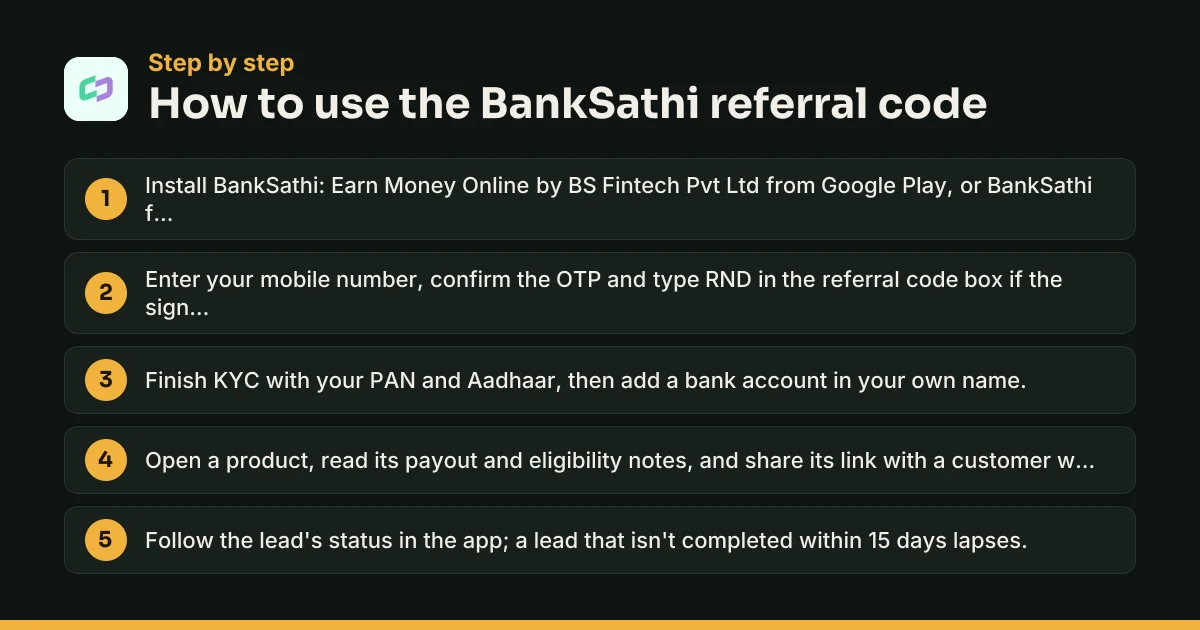
Install the app from Google Play or the App Store, enter your mobile number and confirm the OTP. This is where a referral code is asked for. Type RND exactly, with no spaces. If you opened an advisor's invite link first, the field may already be filled.
Complete KYC
BankSathi's partner guide lists the next steps as verifying PAN and Aadhaar and adding a bank account. Use an account in your own name. You'll also set an M-PIN, which the app asks for again when you withdraw.
Add a first lead
Open a product, read its payout and eligibility notes, then share the link with one person who has asked for that product. The lead appears in your tracker, where you can watch it move from applied to approved or rejected.
Finding your own BankSathi refer code
Your code is created with your account. BankSathi's blog explains that it appears inside the auto-generated message that opens when you tap the share button in the refer section, so the simplest way to pass it on is to send that message as it is. The company's advice is to make sure the code is actually used on each new sign-up after you share the link, because an install without the code doesn't count as yours.
If you can't spot the code, our guide on how to find your referral code lists the menus where apps usually keep it.
Leads, the 15-day window and payouts
Three rules decide when money shows up.
Approval, not application. Commission is tied to the partner approving the customer. A credit card application that the bank declines pays nothing, however much effort went into it.
Fifteen days. BankSathi's blog says a lead expires in 15 days. If your customer opens the link today and finishes video KYC three weeks later, the sale may not be credited to you. Follow up early.
Wallet first, then bank. Approved commission lands in an in-app wallet. To move it, tap Withdraw, choose your bank account and enter your M-PIN. An older BankSathi blog post described payouts being released every Friday; the current Play listing talks about same-day payouts on eligible earnings, subject to the payout schedule and terms. Go by what the app shows for your account. No minimum withdrawal figure is published on the website.
When the code or the 10% doesn't show
The code box wasn't there. If you registered before noticing the field, the account has no inviter attached. Nothing public describes a way to add one later. Write to support@banksathi.com if it matters, and don't open a duplicate account.
The code was rejected. Check for swapped digits or stray spaces. Codes copied from old posts can belong to accounts that no longer exist. More causes are listed on our referral code not working page.
Your friend joined but you see nothing. Sign-ups don't pay. Your 10% follows your friend's approved commission, so look at their lead status first.
A lead is stuck. Partner verification takes time, and some customers abandon the process halfway. If the 15-day window is close, remind the customer to finish.
Before you pitch products to people you know
A credit card or personal loan is a liability for the person who takes it. Recommending one to a relative because the payout is high, when they don't need it or can't repay comfortably, damages their credit record and your relationship. Tell customers plainly that you earn a commission, and let them read the fees and interest rate on the bank's own page before they apply.
Two more cautions. BankSathi's Play listing carries a disclaimer that it does not guarantee any income, so screenshots of large monthly earnings prove nothing about yours. And joining is free: anyone collecting a registration charge, a "training fee" or your OTP in BankSathi's name is running a scam.
Commission you receive is taxable income. Keep your wallet statements for filing.
Other apps that pay for sharing
BankSathi suits someone willing to explain financial products and chase paperwork. If that isn't you, other programmes pay for lighter work:
- CashKaro gives the referrer a share of a friend's shopping cashback.
- EarnKaro pays profit when people buy through deal links you post.
- The earning app referral codes hub lists every such app we've checked.
New to all this? Start with what a referral code is, and read referral codes in banks to see how a bank's own invite scheme differs from an advisor app like this one.
Q: What sort of company runs BankSathi?
The Play Store and App Store both list the developer as BS Fintech Private Limited. News reports from January 2023 say the startup raised about $4 million in a pre-Series A round, with Kotak Securities and Hem Securities among the named investors, and identify Jitendra Dhaka as co-founder and chief executive. It is a distributor of other institutions' products, not a bank.
Q: Is BankSathi itself a bank?
No. Despite the name, it holds no deposits and issues no cards or loans of its own. It lists products from banks, NBFCs and brokers, and its Play listing says those products are offered by the partner institutions under their own eligibility rules. Your customer's account or card is always with the institution, never with BankSathi.
Q: Which products can a BankSathi advisor share?
The Play listing mentions bank accounts, credit cards and personal loans among 150+ products, and BankSathi's blog adds demat accounts and credit lines. Each product page in the app shows its own payout, eligibility notes and application flow. The catalogue changes, so the count you see on a given day may differ.
Q: Do I need any qualification to become a BankSathi advisor?
BankSathi doesn't list one. Its Play description names students, homemakers, salaried people, existing loan and card agents, and CSC or e-Mitra operators as the people it expects to join. What you do need is a PAN, an Aadhaar and a bank account for KYC, plus customers who are eligible for the products.
Q: Does BankSathi charge advisors anything?
No joining fee is mentioned anywhere in its official material. The Play listing repeats that there is no upfront investment, and the FAQ on banksathi.com says the platform doesn't charge its users fees. If someone asks you for a registration or ID-activation payment in BankSathi's name, that person is not BankSathi.
Q: How does the app keep my account secure?
The Play listing mentions an M-PIN and fingerprint lock for opening the app, and BankSathi's blog says the M-PIN is also asked for when you withdraw. KYC details such as PAN, Aadhaar and bank account are described as encrypted. Never share your M-PIN or OTP with a caller, whatever they claim.
Q: Is there training for people who have never sold a financial product?
Yes, and it's free. BankSathi's blog describes webinars and in-app training sessions held through the day, and the Play listing promises product guidance from registration onwards. It's worth sitting through the session for a product before you pitch it, because you'll be asked about fees and eligibility.
Q: How many people use BankSathi?
The company's Play description says 30 lakh+ users. Google Play itself showed 10 lakh+ downloads and a 3.9-star average from roughly 50,000 ratings in November 2026, and the iPhone app had a 4.0 average from about 230 ratings. The user count is BankSathi's own claim; the store numbers are public.
Q: How do I contact BankSathi support?
The support address on its Play listing is support@banksathi.com, and the website runs a chat widget. For a missing commission, send the customer's application date, the product name and the lead ID from the app. Support can check a lead's status with the partner, but it can't overturn a bank's rejection.
Q: Can I use BankSathi on an iPhone?
Yes. There's an App Store app simply called BankSathi, published by BS Fintech Private Limited and updated in November 2026. The Android app has far more ratings, so most third-party walkthroughs show Android screens. Menu names on iOS can differ slightly from what those posts describe.
Q: Does the 10% come out of my own commission?
BankSathi's blog describes the 10% as something the inviter earns on a referred person's successful earnings. It doesn't say the amount is cut from the new advisor's payout, and it doesn't say the opposite either. Compare the commission credited to your wallet with the rate shown on the product page to see for yourself.
Q: Is there a limit on how many advisors I can invite?
No cap appears in BankSathi's public pages, and the Play listing encourages advisors to grow a team. The useful number isn't how many people install the app but how many go on to close leads. Ten sign-ups who never share a product add up to 10% of zero.
Q: Do I earn from the people my referrals invite?
Nothing official says so. BankSathi's published description covers one level only: the person you invited directly and 10% of their successful earnings. Treat claims of multi-level income in WhatsApp forwards or YouTube videos as unverified unless the Refer and Earn screen in your own app spells them out.
Q: Will the code give me a higher commission on products?
No official source says it does. Product payouts are set per product and shown to every advisor on the product page. Third-party pages advertising an extra 10% for the new joiner don't match BankSathi's own wording, which gives the 10% to the inviter.
Q: Can I enter a referral code after I've already registered?
BankSathi's material only talks about the code being used on a new sign-up, and no later edit option is published. If you skipped it, your account still works normally and your product commissions are unaffected. You can ask support, but don't create a second account to fix it.
Q: Is a product link the same thing as my referral code?
No. A product link sends a customer to apply for a specific card, account or loan, and pays you that product's commission on approval. Your referral code brings a new advisor into the app under your name and pays 10% of what they later earn. One is selling, the other is recruiting.
Q: Can I share my BankSathi code in WhatsApp groups and on social media?
The app builds a ready-made share message with your code in it, so sharing is expected. Keep the message honest: say it's commission work with no fixed income. Promising a salary or guaranteed earnings is misleading, and BankSathi's own listing states that it guarantees no particular income.
Q: Do old BankSathi referral codes from 2023 or 2024 still work?
A referral code belongs to an advisor's account, not to a year, so it should keep working while that account is active. There's no annual reset in anything BankSathi has published. If a code is rejected, the likelier causes are a typing mistake or an account that has since been closed.
Q: Why does my friend's lead show nothing in my earnings?
Your share exists only after your friend's own commission does. If their customer is still being verified, was rejected by the bank, or didn't finish within the 15-day lead window, there is nothing to take 10% of. Ask your friend what status the lead shows before writing to support.
Q: Is there tax on BankSathi referral and commission income?
Yes. It's commission income, taxable in your hands, and it needs to be reported even when amounts are small. PAN is part of BankSathi's KYC, and tax may be deducted before payout depending on current rules. Check your wallet statement and Form 26AS. Our referral bonus tax guide covers the basics.
BankSathi offer terms to know
- The code has to go in while the account is being created; BankSathi publishes no way to attach an inviter afterwards.
- The 10% is calculated on the referred advisor's successful earnings, so a friend who never closes a lead earns the inviter nothing.
- Commission is paid only when the bank, NBFC or broker approves the customer; an application alone doesn't count.
- A lead expires 15 days after it is created if the customer hasn't completed the product.
- BankSathi's Play listing says it guarantees no particular income; rates differ by product and can change.
- Payout timing follows the schedule and terms shown in the app, and withdrawals need completed KYC.
- Banks decide every approval. BankSathi can't push through a card or loan for your customer.
BankSathi Referral Code: quick FAQs
What is the BankSathi referral code?
The BankSathi referral code on this page is RND. Enter it when you create your advisor account in the BankSathi app.
What do I get for using a BankSathi referral code?
BankSathi publishes no joining bonus. The code links you to the advisor who invited you, and they receive 10% of your successful earnings.
How much does the referrer earn on BankSathi?
10% of the referred advisor's successful earnings, which BankSathi's blog describes as lifetime.
Where do I find my own BankSathi refer code?
Tap the share option in the app's refer section. Your code is written inside the message the app generates.
Is BankSathi free to join?
Yes. BankSathi says there is no upfront investment and that it charges users no fees.
When does BankSathi pay out?
After the partner approves the lead and commission lands in your wallet. The Play listing mentions same-day payouts on eligible earnings; the app shows the current schedule.
Is BankSathi real or fake?
It's a real, funded company with apps from BS Fintech Private Limited on both stores. Earnings are commission only and not guaranteed.
Written by Recharge n Deals Team
We sign up for every app we list, test the code ourselves and recheck it when the offer changes. Read how we test codes. Code not working? Tell us and we'll recheck it.
Disclaimer: BankSathi is a trademark of its owner. We are not affiliated with BankSathi. Offers are set by BankSathi and can change at any time; check the app before you sign up.