Table of contents (31)Show
- How to claim the Blink.new reward
- Why Blink.new asks Indian visitors for an invite code
- The Blink.new invite code at a glance
- How to enter the Blink.new invite code
- What Blink.new builds
- Blink.new plans and credits in 2026
- Sharing your own Blink referral link
- Free Blink.new invite codes on Reddit, Discord and X
- Blink.new invite code not working?
- More AI tools and referral offers
- Q: Who owns Blink.new?
- Q: Do I need to know how to code to use Blink.new?
- Q: Can Blink.new make Android and iPhone apps?
- Q: Who owns the code and apps I make on Blink.new?
- Q: What is Blink Claw?
- Q: Can I put a Blink.new app on my own domain?
- Q: Does Blink.new charge for each team member?
- Q: When do Blink.new daily credits reset in India?
- Q: What happens to my Blink.new apps if I cancel?
- Q: How do I pay for Blink.new from India?
- Q: Where can I get a Blink.new invite code if I don't have one?
- Q: Is a Blink.new invite code the same as a referral code?
- Q: Does the invite code matter if I'm not in India?
- Q: Can I add a Blink.new invite code after I've signed up?
- Q: Do I need a credit card to claim the 10 bonus credits?
- Q: Do referral credits count towards the 30-credit cap on Blink's free plan?
- Q: Why is my Blink referral showing as Pending?
- Q: Can I invite myself to Blink.new with a second email?
- Q: Are there Blink.new coupon codes for paid plans?
- Q: What's the difference between a Blink referral link and an affiliate link?
- Quick FAQs
From India, blink.new doesn't open on a sign-up form. It opens on a screen titled Invite-Only Access that wants a code first. Type RND there and you can create an account, starting with 10 bonus credits for building apps with AI. People in countries without the gate join freely, and the same code reaches them as a referral link.
Why Blink.new asks Indian visitors for an invite code
Blink checks your location when the site loads. If it places you in one of the 74 countries on its list, the sign-up page is covered by a message saying Blink.new is "currently invite-only" in your country (Blink's wording). India is first on that list. Pakistan, Bangladesh, Nepal, Sri Lanka, Indonesia, Vietnam, Malaysia, Turkey, Egypt, Nigeria, Kenya and Argentina are on it too, along with dozens of African and Central Asian countries. The US, UK, Europe and the Gulf states aren't.
Blink hasn't published a reason, and this isn't a waitlist. Nobody reviews a request. The screen accepts any existing user's code straight away, and it stops appearing once you're logged in.
What counts as an invite code
There's no separate invite system. Every Blink user has a referral link, and the code is the short slug after ref= in that link. The access screen's own hint says so, and its placeholder shows an eight-character example. That's why "Blink invite code", "Blink.new referral code" and "Blink AI invite code" all point to the same thing.
The Blink.new invite code at a glance
| Detail | What we found (checked 15 November 2026) |
|---|---|
| Invite code | RND |
| Where it's required | India and 73 other countries, on the Invite-Only Access screen |
| New user gets | 10 bonus credits |
| Bonus credit expiry | None; spent before daily and plan credits |
| Free plan | 5 credits a day, up to 30 a month, no card |
| Cheapest paid plan | Starter: $25 a month, or $13 a month billed yearly |
| Company | 1Flow, Inc., California |
How to enter the Blink.new invite code
Open the referral link first
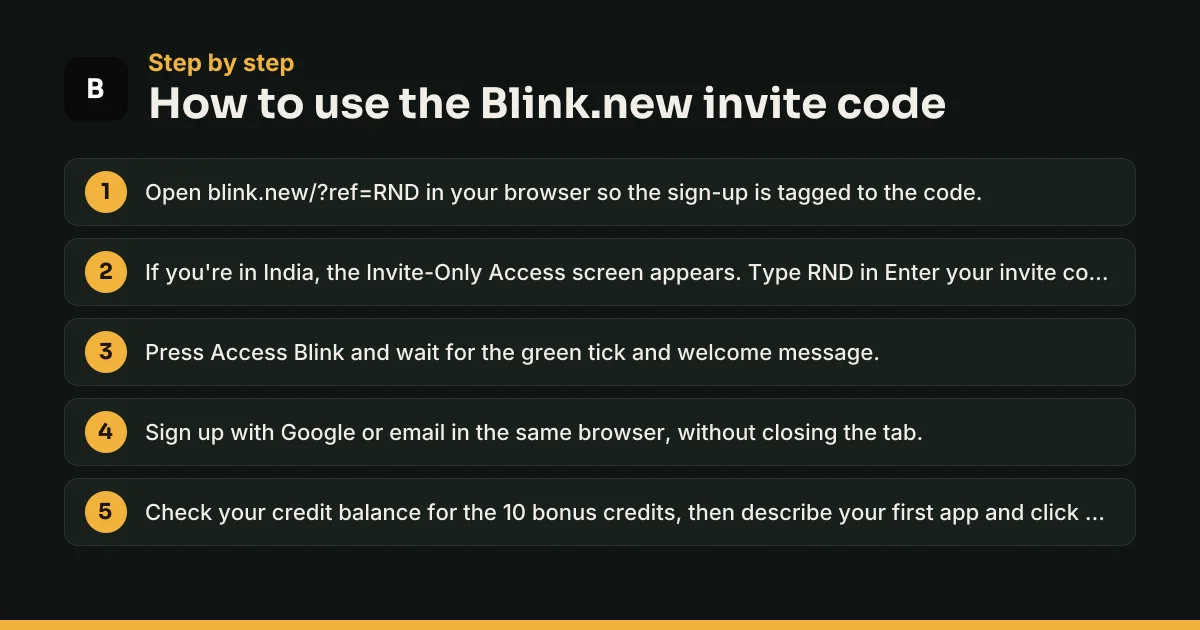
Start by visiting blink.new/?ref=RND in Chrome or any other browser. The ref part tags your future account to the code, which is how Blink's referral system credits new sign-ups. If you're in a gated country, the access screen then loads over the page.
Type the code on the access screen
In Enter your invite code, type RND and press Access Blink. A green tick and a welcome message mean it worked. Now sign up with Google or email in the same browser, because Blink remembers the approval there for about a day.
Typing the code without opening the link also clears the screen. We couldn't confirm from Blink's public pages that the 10 bonus credits attach that way, so opening the link first covers both.
What Blink.new builds
Blink is an AI app builder. You describe software in plain English, and its agent writes the code, adds a database, sign-in and payments, and puts the result on a live web address with SSL. Project types are full-stack web apps, websites, mobile apps and Chrome extensions, and there are more than 40 templates to start from. Blink says over 1 million people build on it and more than 3 million apps have been made.
Newer additions include Blink Claw, an always-on AI agent that answers customers and runs tasks, and a programme for agencies building apps for clients.
Blink.new plans and credits in 2026
Everything on Blink runs on credits. A bug fix, a new feature or a question to the agent uses some, and bigger requests use more. Blink doesn't publish a fixed cost per message, so 10 bonus credits are best spent on short, specific prompts.
| Plan | Paid monthly | Paid yearly | Credits |
|---|---|---|---|
| Free | $0 | — | 5 a day, max 30 a month |
| Starter | $25 | $13 a month ($150 a year) | 100 a month + 5 a day |
| Pro | $50 | $25 a month ($300 a year) | 200 a month + 5 a day |
| Max | From $200 | From $100 a month | 800 or more a month + 5 a day |
| Business | From $40 | From $20 a month | Shared pool of 100 to 50,000 |
These are US dollar prices from Blink's pricing page. Starter brings private projects, production hosting, custom domains and Blink Claw. Pro adds in-app code editing, GitHub sync and advanced AI models. Max adds credit rollover and publishing to the App Store and Google Play.
Where the 10 bonus credits fit
Blink spends credits in a fixed order: bonus first, then the 5 daily credits, then plan credits. Daily credits reset at midnight Pacific time, which is 1:30 pm in India from early November to early March and 12:30 pm the rest of the year. On the free plan, the 30-a-month cap applies to daily credits only, so referral credits sit on top of it.
Bought credits never expire either. Top-up packs run from 100 credits for $40 to 3,750 credits for $1,000, the last one including a 50% bonus.
Paying from India
Blink charges cards through Stripe and lists Visa, Mastercard, American Express and Discover. Use a card with international online payments switched on, and expect your bank's foreign currency fee. Every fee is non-refundable, so test your idea on the free plan before you pay.
Sharing your own Blink referral link
After you join, Settings → Referrals shows your link, your code and buttons to share on X, LinkedIn or email. The reward for the person sharing is where Blink's own pages disagree. The in-app Referrals panel is headed "Give 10, Get 100": your friend gets 10 credits, and you get 100 once they subscribe to a paid plan. Blink's credits documentation, last updated 19 October 2026, still describes "Give 10, Get 10", with your 10 arriving when the friend publishes a first app. Go by what your own Referrals panel shows.
Each referral carries a status: Pending while Blink waits for the qualifying step, Completed once your credits land, and Invalid for self-referrals and other failed checks.
Credits vs the $100 affiliate programme
Cash comes from a separate scheme. Approved affiliates at affiliates.blink.new earn a flat $100 for each person who clicks their link and upgrades to a paid plan within 30 days. Payouts go out monthly by PayPal or bank wire, with a $10 minimum. The affiliate terms bar self-referrals and any Google advertising.
Free Blink.new invite codes on Reddit, Discord and X
If you go hunting for a free code, any genuine user's code clears the screen. Keep these in mind:
- Codes are free. Nobody needs to sell you one.
- Nobody needs your password, card details or Google login to give you a code.
- "Invite code generator" sites can't make valid codes, because Blink checks each code against real referral codes.
- Posts promising hundreds of free credits from a code are wrong. A new user gets 10.
Blink.new invite code not working?
"Invalid invite code"
Look for a stray space or a missing character, and make sure you didn't paste the whole link. Only the slug after ref= goes in the box.
The access screen came back
The approval is stored in one browser for about a day. Switching browsers, using incognito or clearing cookies brings the screen back, so enter the code again and finish sign-up in one go.
No bonus credits
Check that the account is new and was created after you opened the referral link. If the credits still aren't there, email support@blink.new with your account email and the code you used.
You already have an account
Tap Log in on the access screen. Existing users don't need a code.
More AI tools and referral offers
For other software and app offers, see our service and tool referral codes. The PixVerse referral code adds credits for AI video, and our Sora invite code page covers an AI app that used invite codes before it shut down. If you only need a simple one-page site, the Carrd referral code may suit you better. New to all this? Read what a referral code is.
Q: Who owns Blink.new?
Blink's terms of service name 1Flow, Inc., a California company, as the business you sign up with, and the site footer carries a Blink Inc. copyright. Y Combinator's company directory lists Blink with Kai Feng as founder, a San Francisco base and the Winter 2022 batch. Support runs through support@blink.new and the Blink Discord server.
Q: Do I need to know how to code to use Blink.new?
No. You describe what you want in plain English, and Blink's agent writes the code, sets up the database and publishes the app. Coders aren't shut out, though. Pro adds in-app code editing, background jobs and Git sync with your own GitHub repository. Starter and Pro let you download your code for 5 credits, while Max includes downloads free.
Q: Can Blink.new make Android and iPhone apps?
Yes. Mobile app is one of the project types on Blink's home screen, next to Full Stack, Website and Extension. Building one works on any plan with credits, but publishing straight to the App Store and Google Play is a Max feature on Blink's pricing table. Blink's docs on Play Store publishing also say it needs Max or above.
Q: Who owns the code and apps I make on Blink.new?
You do. Blink's terms say you keep full ownership of the code and apps you create, provided you have rights to whatever you feed in, and you may sell, publish or open-source them. The catch is visibility: on the free plan, projects are public by default and may be published to Blink's GitHub repository. Use Starter or above for private work.
Q: What is Blink Claw?
Blink Claw is an always-on AI agent that Blink hosts for you. Blink pitches it as a helper that answers your customers and handles tasks around the clock, even while you sleep, without you running a server. The pricing table lists it from the Starter plan upwards, so a free account with 10 bonus credits can't run one.
Q: Can I put a Blink.new app on my own domain?
Yes, from the Starter plan. On Starter and Pro, connecting a custom domain costs 5 credits; Max includes domains free. Keeping an app live on production hosting is also paid in credits: Blink says 50 credits a month covers up to 10,000 visits. Free apps stay on a Blink web address with SSL.
Q: Does Blink.new charge for each team member?
No. Every plan, the free one included, allows unlimited members, and Blink bills for credits rather than seats. People with view-only access never use credits. The Business plan adds one shared credit pool and one invoice, with prices starting at $20 a month billed yearly, but it has no minimum team size.
Q: When do Blink.new daily credits reset in India?
At midnight Pacific time, which is 1:30 pm IST from early November to early March and 12:30 pm IST for the rest of the year, when the US is on daylight time. Daily credits don't carry over. On the free plan they also stop once you've received 30 in a calendar month, until the 1st of the next month.
Q: What happens to my Blink.new apps if I cancel?
You keep paid features until the end of the period you paid for, then the account drops to the free plan. Blink says projects and code are never deleted and can still be exported to GitHub. Apps on production hosting pause, and Blink holds their web address for about five weeks so you can restart hosting from settings.
Q: How do I pay for Blink.new from India?
Blink bills in US dollars through Stripe and lists Visa, Mastercard, American Express and Discover cards. Turn on international online transactions for your card first, and expect your bank to add a foreign currency charge. Billing renews automatically every month or year, so cancel from billing settings before the renewal date if you don't want to continue.
Q: Where can I get a Blink.new invite code if I don't have one?
From anyone who already uses Blink. Every account has a referral link under Settings → Referrals, and the invite code is the slug after ref= in that link. Our code, RND, works the same way. If you search Reddit, Discord or X instead, any genuine user's code will clear the screen.
Q: Is a Blink.new invite code the same as a referral code?
Yes. Blink has one system. When you press Access Blink, the code you typed is checked against Blink's referral codes, so a valid invite code is simply someone's referral code. That's why searches for a Blink invite code, Blink referral code and Blink AI invite code all lead to the same thing.
Q: Does the invite code matter if I'm not in India?
Outside the 74 gated countries there's no code box at all, and sign-up is open. The code still counts as a referral, but only if it arrives through the link, so open blink.new/?ref=RND before you create your account. Signing up from the plain blink.new address leaves you without a referrer.
Q: Can I add a Blink.new invite code after I've signed up?
We found no setting for it. Blink's docs describe the reward for people who create an account through a referral link, and the access screen only appears to logged-out visitors. If you already have an account, you can still build on the free plan and earn credits by sharing your own link.
Q: Do I need a credit card to claim the 10 bonus credits?
No. Blink's free plan needs no card, and the 10 bonus credits land on a free account. They're spent before your 5 daily credits, so your first requests come out of the bonus. A card only comes in when you pick a paid plan or buy a top-up.
Q: Do referral credits count towards the 30-credit cap on Blink's free plan?
No. The 30-a-month cap applies to the 5 daily refresh credits. Bonus credits from referrals and purchases are a separate balance that Blink uses first. So in your first month on the free plan, 10 bonus credits plus a full run of daily credits gives you up to 40 credits to build with.
Q: Why is my Blink referral showing as Pending?
Pending means your friend has signed up but hasn't yet done the step that triggers your reward. Blink's docs say that step is publishing a first app, while the in-app panel says it's subscribing to a paid plan. Completed means your credits were added. Invalid usually means a self-referral or a failed check.
Q: Can I invite myself to Blink.new with a second email?
Don't. Blink marks self-referrals Invalid, its terms ban creating multiple free accounts to get around limits, and it reserves the right to close accounts that abuse the referral or affiliate programmes without a refund. Extra credits aren't worth losing the account that holds your projects.
Q: Are there Blink.new coupon codes for paid plans?
We didn't find any public coupon on Blink's own pages. The official savings are yearly billing, which halves the price and works out to six months free, and bonus credits on large top-ups: 20% extra on the $500 pack and 50% extra on the $1,000 pack. Be wary of sites selling Blink discount codes.
Q: What's the difference between a Blink referral link and an affiliate link?
A referral link comes with every account and pays in credits. An affiliate link comes from affiliates.blink.new after Blink approves your application, and it pays cash: a flat $100 for each person who upgrades to a paid plan within 30 days of clicking. Affiliate payouts go monthly by PayPal or bank wire once you pass $10.
Blink.new offer terms to know
- The access screen takes any Blink user's referral code: the slug after ref= in their referral link. Codes are free, and Blink doesn't sell them.
- Credits only pay for AI work on Blink. They aren't cash, and bonus credits from referrals never expire.
- Blink's terms ban opening extra free accounts to get around limits, and a self-referral is marked Invalid.
- Projects on the free plan are public and may be published to Blink's GitHub repository. Private projects start at Starter.
- All fees are non-refundable. Cancelling stops the next charge, and you keep paid features until the period you paid for ends.
- Plans are priced in US dollars and charged by card through Stripe.
- Blink can close accounts that abuse its referral or affiliate programmes, without a refund.
Blink.new Invite Code: quick FAQs
What is the Blink.new invite code?
Use **RND**. Type it on the Invite-Only Access screen, or open blink.new/?ref=RND before you sign up, to get 10 bonus credits.
Is Blink.new invite-only?
Only in some places. Blink shows an invite screen to logged-out visitors from 74 countries, India included. Elsewhere, sign-up is open.
Is Blink.new free?
Yes. The free plan gives 5 credits a day, up to 30 a month, with no card. Paid plans start at $13 a month billed yearly.
How many credits does the invite code give?
10 bonus credits for a new account, according to Blink's docs and its in-app referral panel. They never expire.
Where do I type the Blink.new invite code?
In the Enter your invite code box on the Invite-Only Access screen, which appears when you open blink.new from a gated country.
Do Blink.new credits expire?
Bonus and top-up credits don't. Daily credits reset at midnight Pacific time, and plan credits reset each cycle unless you're on Max.
Can I get a refund from Blink.new?
No. Blink's terms make all fees non-refundable. You can cancel anytime and keep paid features until the period ends.
Written by Recharge n Deals Team
We sign up for every app we list, test the code ourselves and recheck it when the offer changes. Read how we test codes. Code not working? Tell us and we'll recheck it.
Disclaimer: Blink.new is a trademark of its owner. We are not affiliated with Blink.new. Offers are set by Blink.new and can change at any time; check the app before you sign up.