Table of contents (31)Show
- How to claim the PixVerse reward
- What the PixVerse code gives you
- Claiming the 100 credits: app first, web later
- How far 100 credits go next to the free allowance
- PixVerse plans and credit packs in 2026
- Inviting friends from your own PixVerse account
- Invite code, refer code or R1 code: which one you need
- PixVerse vs Sora: no waitlist to get past
- Cash rewards: affiliate and creator schemes
- When the PixVerse referral code won't apply
- More AI and app referral codes
- Q: Who runs PixVerse?
- Q: What can I make with the PixVerse app?
- Q: Which AI models does PixVerse use?
- Q: Is the PixVerse app on Google Play the official one?
- Q: How long does PixVerse keep the videos I generate?
- Q: Do I lose credits when a PixVerse video fails?
- Q: How do I cancel a PixVerse plan bought in the app?
- Q: How do I delete my PixVerse account?
- Q: Are PixVerse app credits the same as API credits?
- Q: Can I use PixVerse in India?
- Q: Who earns credits when someone uses my PixVerse code?
- Q: Can I paste a PixVerse referral code on the website?
- Q: Do PixVerse referral credits expire?
- Q: Can referral credits remove the PixVerse watermark?
- Q: Is a PixVerse referral code a discount on plans?
- Q: What does the Copy Code Link button do?
- Q: Does PixVerse pay cash for referrals?
- Q: How long does a PixVerse affiliate referral last?
- Q: Is a PixVerse referral code free?
- Quick FAQs
Paste PixVerse referral code RND into the PixVerse app after you create your account, and you get 100 bonus credits to spend on AI video. That number comes from PixVerse's own referral page on share.pix.video, which tells newcomers a friend has sent them 100 credits for video generation. The catch: you claim them in the mobile app, not on the website, and the code is meant for people joining PixVerse for the first time.
Once claimed, the credits also appear on app.pixverse.ai, because PixVerse's app FAQ says the app and web share one account and one balance.
What the PixVerse code gives you
| Detail | What applies |
|---|---|
| Referral code | RND |
| New user gets | 100 credits for AI video |
| Where you claim it | Inside the PixVerse app |
| Person who shared the code | Credits, amount shown on their invite task |
| Free plan without a code | 60 starting credits, then 30 a day |
| Cheapest paid plan | Standard, $10 a month |
| Same credits on the web? | Yes, one balance for app and web |
Checked on 15 November 2026. PixVerse doesn't publish a separate referral terms page, so the inviter's reward and any limits are whatever the app shows on the day.
Claiming the 100 credits: app first, web later
PixVerse's referral page sums up the process in three short lines: copy your friend's code, download and join PixVerse, then paste the code to claim. In practice:
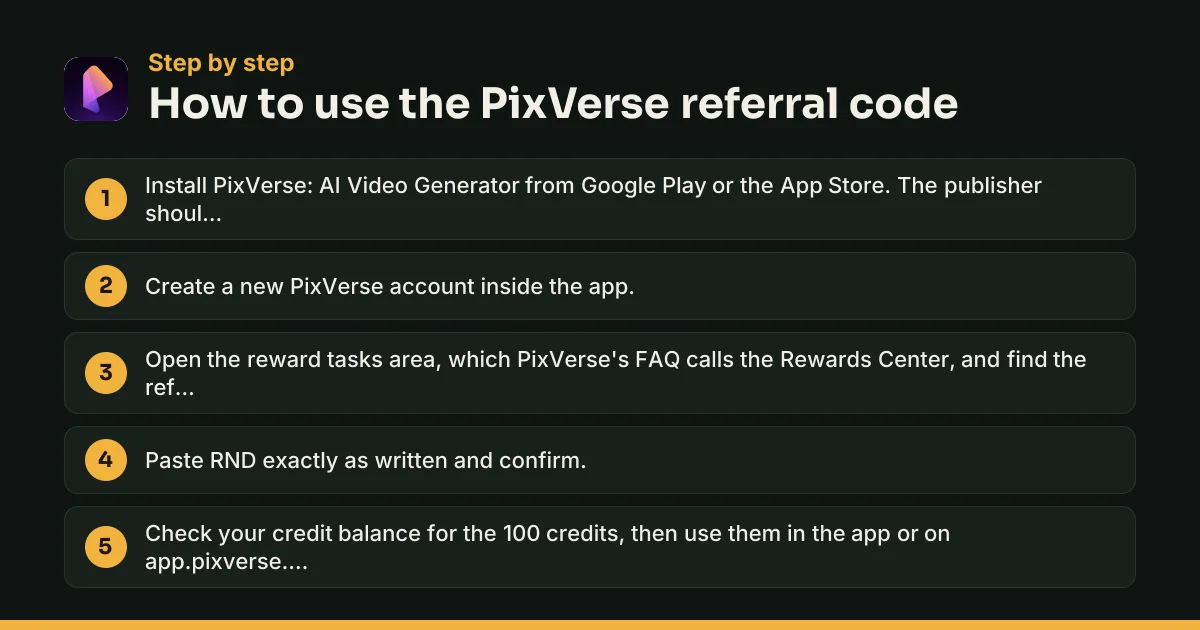
- Install PixVerse: AI Video Generator from Google Play or the App Store, published by PixVerse.
- Sign up for a new account inside the app.
- Go to the reward tasks area. The Download App button on the share page opens the app's task centre, and the PixVerse FAQ calls this part of the app the Rewards Center.
- Paste RND and confirm.
- Check your credit balance. The same credits are there when you log in on app.pixverse.ai.
Arriving through a share.pix.video link
A friend's link looks like share.pix.video/referral/ followed by their code. The page shows the friend's name, a Copy Code Link button and a Download App button. Tap Copy Code Link before installing. Opening the link alone doesn't add credits; pasting the code does.
How far 100 credits go next to the free allowance
PixVerse's free Basic plan starts you with 60 credits and then gives 30 more every day. Paying members get 60 a day on top of their plan. Daily credits reset at 00:00 UTC, which is 5:30 am in India, and whatever you don't spend disappears at the end of that day.
The 100 referral credits behave differently. PixVerse's web FAQ, as set out on its AI information page, says promotional bonus credits stay in your account until used. Think of the referral bonus as a pot to save for a longer or sharper clip, while the daily 30 cover quick tests.
How many videos 100 credits buy depends on the model, clip length and resolution. If a generation fails, PixVerse puts the credits back.
Two limits stay in place however many credits you hold. Free downloads carry a PixVerse watermark, and PixVerse allows commercial use only for content made through paid services, meaning a subscription or a credit pack. Credits you got for free don't fall into either group, so treat those clips as personal use.
PixVerse plans and credit packs in 2026
| Plan | Monthly billing | Yearly billing | Credits every 30 days | Output |
|---|---|---|---|---|
| Basic | Free | — | 60 at start, then 30 a day | Watermarked |
| Standard | $10 | $96 ($8 a month) | 1,200 | Up to 720p, no watermark |
| Pro | $30 | $288 ($24 a month) | 6,000 | Up to 4K |
| Premium | $60 | $576 ($48 a month) | 15,000 | Up to 4K |
| Ultra | $199 (offer; $249 normally) | $1,788 ($149 a month) | 25,000 | Up to 4K |
These are PixVerse's web prices in US dollars as listed in October 2026. Plan credits refresh every 30 days from the moment you subscribed and don't roll over, and yearly billing doesn't hand you a year's credits at once.
Credit packs cost $5 for 500, $20 for 2,000, $50 for 5,000 and $100 for 10,000. Subscribers get extra credits on packs: 10% on Standard, 30% on Pro and 50% on Premium or Ultra. PixVerse doesn't refund packs, used or unused.
Rupee prices in the Android app
The Google Play listing shows in-app purchases from ₹440 to ₹59,000 per item. App purchases are billed through Google Play or the App Store, so cancellations and refund requests go there rather than to PixVerse.
Inviting friends from your own PixVerse account
Once you're in, you can share a code of your own. No public PixVerse page lists how much the inviter earns per friend, so read the figure off the invite task in the app before you start sending links. Your friend gets the same 100-credit welcome, as long as they paste your code in the app.
Share it with people who will actually use PixVerse. Making extra accounts to claim your own code is a bad bet: PixVerse's terms say an account may be used only by its owner and can't be shared, sold or handed over.
Invite code, refer code or R1 code: which one you need
Nobody needs a code to join PixVerse. The app and website are open to anyone aged 16 or over, and younger users can join with a parent's consent and supervision. Searches for a "PixVerse invite code", "PixVerse refer code" or "PixVerse AI referral code" all lead to the same thing: a friend's referral code that adds credits.
What happened to PixVerse R1 invite codes
R1 is a different product, a real-time "world model" that keeps generating a scene as you interact with it. PixVerse launched it on 12 January 2026 at realtime.pixverse.ai, and early guides described an invite-code screen. That address now redirects to world.pixverse.video, home of the successor R2, which PixVerse introduced on 22 September 2026 with a set of worlds open to explore. The R2 announcement mentions no invite code, so an old R1 code has nothing left to open.
PixVerse vs Sora: no waitlist to get past
OpenAI's Sora app used invite codes as a gate. Without one, you sat on a waiting screen. As our Sora invite code page explains, OpenAI shut the Sora app in April 2026, and no code works there now.
PixVerse runs the other way round. Anyone can sign up and generate on the free daily allowance, and a referral code simply tops up the credits. If you came from Sora, PixVerse's text-to-video and image-to-video tools are the nearest match.
Cash rewards: affiliate and creator schemes
The in-app referral pays in credits. Two separate PixVerse schemes pay money:
- Affiliate programme: 30% recurring commission for 12 months on each subscriber you refer, rising to 35% once you pass $5,000 a month in referred revenue. The cookie lasts 90 days, and payouts go by PayPal or international bank wire. Details are on PixVerse's affiliate page.
- PixVerse Earn: a creator scheme that rewards approved PixVerse videos posted on Instagram, YouTube or X with cash, credits or both. Cash withdrawals go through Tremendous.
Neither replaces the 100-credit welcome. Your friend still claims that by pasting a code.
When the PixVerse referral code won't apply
You're on the website
The claim step lives in the app. Install it, log in with the same account and paste the code there.
Your account isn't new
PixVerse's referral page is aimed at people downloading and joining for the first time. An account you've used for a while may not accept a code.
The code was copied wrongly
Copy RND exactly, with no spaces before or after. The Copy Code Link button avoids typos.
The credits haven't shown up
Close and reopen the app, then check your balance on the web too. If they're still missing, email support@pixverse.ai with your account email and the code you used.
Someone sold you the code
PixVerse codes are free. Anyone charging for one, or asking for your login, is running a scam.
More AI and app referral codes
For other tools that reward sign-ups, see the service app referral codes. The Vidrush referral code adds credits to a paid AI video plan, and our guide to what a referral code is explains why the inviter and the new user often get different rewards.
Q: Who runs PixVerse?
PixVerse is run by AIVORA PTE. LTD., a company based in Singapore, according to its web terms of service. PixVerse says it was founded in 2023, and its official announcements name Changhu Wang as co-founder and CEO and Jaden Xie as co-founder and President. Disputes under the terms go to arbitration in Singapore.
Q: What can I make with the PixVerse app?
Short AI videos from a text prompt or a photo, plus a long list of extras: trending effect templates, talking avatars with lip-sync, music videos from an uploaded song, sound effects, video extension and upscaling to 4K. The app also makes and edits AI images. Most features cost credits, and the amount depends on the model and settings.
Q: Which AI models does PixVerse use?
Its own PixVerse V6 model handles most video generation. The Google Play listing says the app also offers selected outside models for image and video work, naming Qwen-Image, GPT Image 2, Nano Banana and Seedream among them. Which models you can pick, and at what credit cost, depends on your plan and changes as new versions arrive.
Q: Is the PixVerse app on Google Play the official one?
Yes, if the developer shown is PixVerse and the app is called PixVerse: AI Video Generator. In November 2026 it had more than 5 crore downloads, a 12+ rating, ads and in-app purchases. Avoid APK files and lookalike apps with similar names, since your login and payments should only go through the official listing.
Q: How long does PixVerse keep the videos I generate?
Six months. PixVerse's website FAQ says older videos stop showing in your account after that, partly because its models change every month or two and partly because of the sheer volume of generations. If a clip matters to you, download it soon after you make it, and keep your own copy.
Q: Do I lose credits when a PixVerse video fails?
No. PixVerse's FAQ says credits for videos that weren't generated successfully go back into your account. That's useful when you're spending referral credits on a tricky prompt. A video that does generate but looks wrong isn't refunded, though, so short, simple test prompts are the cheaper way to experiment.
Q: How do I cancel a PixVerse plan bought in the app?
Through the store, not PixVerse. On Android, open Google Play, go to Subscriptions, pick PixVerse and choose to cancel. On iPhone, do the same from your Apple ID subscriptions. PixVerse's FAQ says refunds for app purchases are also handled by Apple or Google, so request them there.
Q: How do I delete my PixVerse account?
Go to Settings, then Account, then Delete Account. PixVerse keeps the data for five days, during which you can't log in, and then deletes it for good. If you deleted it by mistake, email support@pixverse.ai within those five days with your sign-up email. Cancel any paid plan first, because deleting the account doesn't stop billing.
Q: Are PixVerse app credits the same as API credits?
No. The app and website share one credit balance, but the developer API on platform.pixverse.ai has its own credits and memberships, priced at 225 credits per US dollar. Referral credits from the app can't be moved to the API, and API credits don't show up in the app.
Q: Can I use PixVerse in India?
Yes. The app is listed on the Indian Google Play store with prices in rupees, and the website works from India. Web plans are listed in US dollars, so check the final amount at checkout, while purchases through Google Play are charged in rupees using your Play payment methods.
Q: Who earns credits when someone uses my PixVerse code?
Both sides. Your friend gets the 100-credit welcome shown on PixVerse's referral page, and you earn credits for bringing them in. PixVerse doesn't publish the inviter's amount on its website or help pages, so check the invite task in your app for the figure that applies before you start sharing.
Q: Can I paste a PixVerse referral code on the website?
PixVerse's referral page sends new users to download the app and paste the code there, so treat the app as the place to claim. Once the credits land, they're usable on app.pixverse.ai too, because the app and web share the same account and credit balance. Just log in with the same account on both.
Q: Do PixVerse referral credits expire?
PixVerse's web FAQ says purchased and promotional bonus credits don't expire and stay until used. That's different from daily credits, which vanish at the end of each day, and plan credits, which reset every 30 days. If you want to be sure how your referral credits are labelled, check the credit details in your account.
Q: Can referral credits remove the PixVerse watermark?
No. PixVerse ties watermark-free downloads to a subscription. On the web, subscribers hover over the download button and choose the watermark-free option; in the app, they tap Remove Watermark while downloading. Credits alone, whether daily, referral or bought in a pack, don't lift the watermark on a free account.
Q: Is a PixVerse referral code a discount on plans?
No. The referral code adds credits; it doesn't lower the price of Standard, Pro, Premium or Ultra. Any price cut on a plan, such as the 20%-off label PixVerse showed on Ultra in October 2026, appears on the plan page itself without a code. Pages promising percentage discounts from a PixVerse 'promo code' aren't quoting PixVerse.
Q: What does the Copy Code Link button do?
It appears on the share.pix.video page that opens when you tap a friend's invite link. It copies their referral code so you can paste it after installing the app. The page also shows the friend's name and a Download App button. Opening the link by itself doesn't add credits; pasting the code does.
Q: Does PixVerse pay cash for referrals?
Not through the in-app invite, which pays credits. Cash comes from two separate schemes: the affiliate programme, which pays a share of subscription revenue by PayPal or bank wire, and PixVerse Earn, which rewards approved videos posted on Instagram, YouTube or X with cash, credits or both. Each has its own sign-up.
Q: How long does a PixVerse affiliate referral last?
PixVerse says its affiliate cookie stays valid for 90 days from the first click. If the person subscribes within that window, the affiliate earns 30% of their payments for 12 months. Commissions are confirmed only after the refund window closes, and they're reversed if the subscriber gets a refund.
Q: Is a PixVerse referral code free?
Always. Codes come free from existing users, and PixVerse doesn't sell them. If a site, Telegram channel or seller asks you to pay, fill in a survey or hand over your PixVerse or Google login to get a code, walk away. Report payment scams at cybercrime.gov.in or by calling 1930.
PixVerse offer terms to know
- The 100 credits are for generations inside PixVerse. They aren't cash and can't be withdrawn.
- Free daily credits (30 a day without a plan, 60 with one) reset at 00:00 UTC, which is 5:30 am in India, and lapse at the end of the day if unused.
- Plan credits renew every 30 days and don't roll over. PixVerse's web FAQ says purchased and promotional bonus credits stay until used.
- Videos made on the free plan download with a PixVerse watermark. Removing it needs a subscription.
- PixVerse permits commercial use only for content made through paid services, meaning a subscription or a credit pack.
- Users must be 16 or older, or younger with a parent's or guardian's consent and supervision.
- An account is for its owner only. PixVerse's terms bar lending, sharing, selling or transferring it.
PixVerse Referral Code: quick FAQs
What is the PixVerse referral code?
Use **RND**. Paste it in the PixVerse app after creating your account to get 100 bonus credits for AI video.
How many credits does the PixVerse referral code give?
PixVerse's referral page offers new users 100 credits for AI video generation. The inviter's reward is shown in their own app.
Where do I enter a PixVerse referral code?
In the PixVerse mobile app, in the reward tasks area PixVerse calls the Rewards Center. The credits then show on the website too.
Is PixVerse free to use?
Yes, with limits. The free plan starts with 60 credits and adds 30 a day, but videos carry a watermark and can't be used commercially.
Do I need a PixVerse invite code to sign up?
No. Anyone 16 or over can join. An invite or referral code only adds bonus credits to a new account.
Does a PixVerse R1 invite code still work?
No. The R1 address now redirects to PixVerse R2 at world.pixverse.video, and PixVerse's R2 announcement mentions no invite code.
How much does PixVerse cost per month?
Web plans run from $10 a month for Standard to $199 for Ultra, with cheaper monthly rates on yearly billing. App prices are in rupees.
Why didn't my PixVerse referral code work?
Usually because it was entered on the website, mistyped, or used on an account that isn't new. Paste it in the app on a fresh account.
Written by Recharge n Deals Team
We sign up for every app we list, test the code ourselves and recheck it when the offer changes. Read how we test codes. Code not working? Tell us and we'll recheck it.
Disclaimer: PixVerse is a trademark of its owner. We are not affiliated with PixVerse. Offers are set by PixVerse and can change at any time; check the app before you sign up.