
Table of contents (31)Show
- How to claim the Google Pay reward
- Google Pay referral code: offer details
- What is the referral code in GPay?
- How to use a referral code in Google Pay
- Where to find your referral code in Google Pay
- How to refer and earn in Google Pay
- Google Pay offers: other ways to earn rewards
- Google Pay referral code not working? Fixes
- UPI safety tips for Google Pay users
- Google Pay referral rules in plain words
- More UPI and app referral codes
- Q: What is Google Pay?
- Q: Was Google Pay earlier called Tez?
- Q: Is Google Pay free to use?
- Q: Can I use a RuPay credit card on Google Pay?
- Q: What is UPI Circle on Google Pay?
- Q: Can I tap my phone to pay with Google Pay?
- Q: Can I earn gold as a Google Pay reward?
- Q: Do all Google Pay scratch cards have money in them?
- Q: How does Google Pay keep my payments secure?
- Q: How does the ₹201 Google Pay referral reward work?
- Q: What are Google Pay bonus quests?
- Q: Which payments count for the Google Pay referral?
- Q: How many friends can I refer on Google Pay?
- Q: Can I use a Google Pay referral code on a second-hand phone?
- Q: If two friends invite me to Google Pay, who gets the reward?
- Q: Can I get the Google Pay referral reward if I reinstall the app?
- Q: What if my bank account isn't linked when the referral reward comes?
- Q: Where can I read the Google Pay referral terms in the app?
- Q: Google Pay referral code kaise use kare?
- Quick FAQs
Use Google Pay referral code RND when you join Google Pay, then make your first payment within 28 days. Under the referral rules on Google Pay's help centre in November 2026, you get ₹21 cashback, and the person who invited you gets ₹101 plus up to ₹100 more through weekly bonus quests. The main condition: you must be completely new to Google Pay, on a phone, number and bank account that have never been used on it.
Google says offers can vary from user to user, so the terms in your app's Referrals section are the ones that apply to you.
Google Pay referral code: offer details
| Detail | What it means |
|---|---|
| Referral code | RND |
| App | Google Pay, by Google |
| New user gets | ₹21 cashback after the first payment |
| First payment deadline | Within 28 days of signing up |
| Bonus quests | 4 weeks; new user earns ₹5 to ₹50 per eligible payment |
| Referrer gets | ₹101, plus ₹25 per weekly quest (up to ₹201) |
| Referrer limit | 100 rewards and ₹9,000 per financial year |
| Where cashback goes | Your linked bank account |
| Credit time | A few days; contact support after 7 business days |
| Cost of the code | Free |
These figures come from Google Pay's official Refer your friends to Google Pay help page. Google Pay's referral offer has changed many times since the app started as Tez, so older articles and videos show other amounts and other menus.
What is the referral code in GPay?
A Google Pay referral code is a short code that ties your new account to the existing user who invited you. Every user has one, and it also sits inside their invite link, so tapping the link and typing the code do the same job. For the basics, read our guide on what a referral code is.
The reward is paid in cash to your bank account, not as a wallet balance. That's one way Google Pay differs from PhonePe's refer and earn, which pays referral rewards as a gift voucher.
How to use a referral code in Google Pay
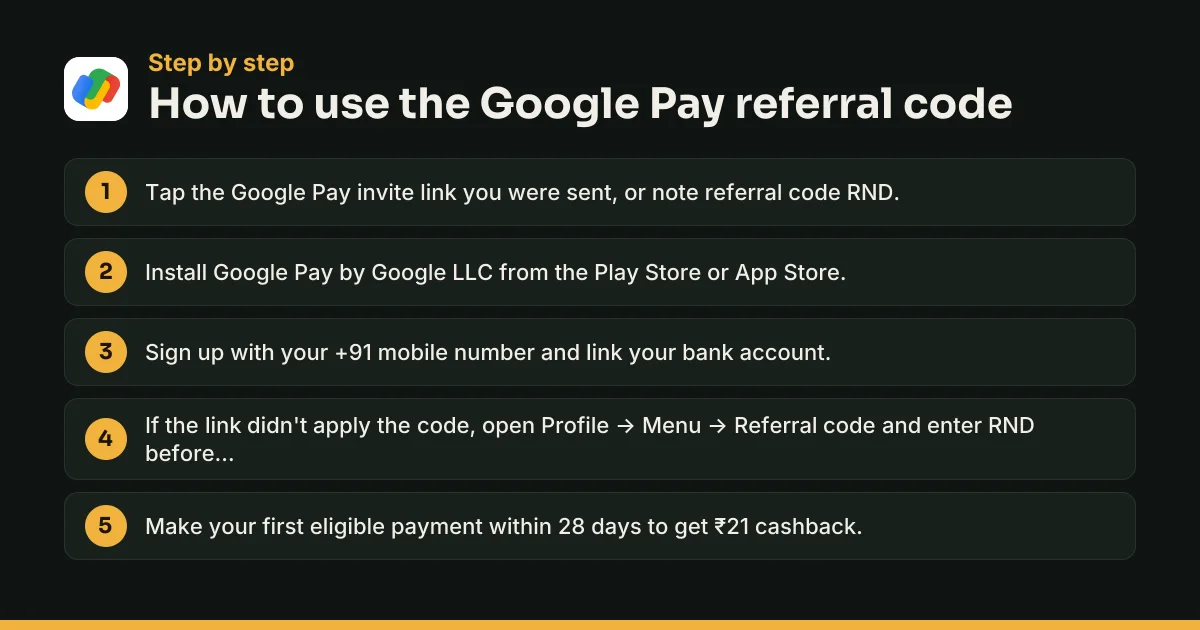
The steps box above is the short version. Here's the detail, so the reward doesn't slip away.
Before you start: check you qualify
Google's help page lists these reasons a new user can be ineligible:
- Google Pay was used on the phone before, even if it was uninstalled.
- The mobile number, email address or bank account was already registered with Google Pay.
- You already used someone else's code or got a referral reward before.
- The phone is refurbished or second-hand and was used on Google Pay, or the number is recycled.
You also need an Indian mobile number starting with +91 and a bank account that supports UPI.
Option 1: join through the invite link
This is the safest way. Tap the referral link your friend sent, follow the prompts to download Google Pay, and the code is applied automatically. Google even lists downloading the app directly, instead of through the referral link, as a reason a friend may miss out, so use the link if you have it.
Option 2: where to enter the referral code in Google Pay
If you only have the code, or installed the app already:
- Download Google Pay from the Google Play Store or the App Store. Check that the developer is Google LLC.
- Open the app, sign up and link your bank account.
- Tap your profile icon at the top right to open your profile page.
- At the top right, tap Menu, then Referral code.
- Type RND exactly as written. A valid code shows a success screen.
If there's no Referral code option, Google says the account isn't eligible for the programme. Enter the code before your first payment, since the reward is tied to that payment.
Make your first payment within 28 days
Any one of these counts: sending money to another Google Pay user, paying a bill in the app, paying a merchant through a Google Pay UPI ID or UPI number, or transferring to an external bank account. Do it within 28 days of signing up, and the ₹21 cashback goes to your linked bank account.
Where to find your referral code in Google Pay
To invite others with your own code:
- Open Google Pay and tap your profile picture at the top right.
- Tap Invite friends, get rewards to copy your code.
- Tap Share to send it on WhatsApp, SMS or another app.
To send a link instead, scroll to the bottom of the home screen, tap Invite and pick an app. To check your terms, open Offers & rewards, tap Referrals, then See offer.
How to refer and earn in Google Pay
Each friend who joins with your code and makes a first payment within 28 days earns you ₹101. They're then invited to 4 weekly bonus quests, and you get ₹25 for each week they complete an eligible payment. That's up to ₹201 per friend. You can earn up to 100 referral rewards and ₹9,000 in a financial year (1 April to 31 March).
To make your invites count:
- Pick people who have never used Google Pay, on a phone and number that are new to it.
- Send the link, not just the code, so it's applied automatically.
- Remind them to pay within 28 days. Google suggests a nudge too.
- Keep your bank account linked. Referral money goes there, not to a wallet.
Google Pay offers: other ways to earn rewards
Referrals are one of three reward routes Google lists. The others:
- Offers: limited-time deals for specific businesses and payment types, paying scratch cards, cashback or vouchers. Read each offer's details in the app.
- Rewards path: described on Google's Earn rewards with Google Pay page. Each eligible payment of ₹50 or more moves you one step, with one step per unique recipient a week and 10 steps a week at most. Paying a friend, paying a business by QR code, UPI request or UPI ID, and paying an external bank account count. Mobile recharges, gold purchases and spot bookings don't. Steps unlock scratch cards and the reward bazaar, where you pick a reward.
Find what you've earned under Offers & rewards → Rewards. Claim rewards within 45 days; Google's offer terms say unclaimed rewards are forfeited after that.
Google Pay referral code not working? Fixes
The "Referral code" option is missing
Google's rule is simple: no option means no eligibility, usually because the phone, number or bank account was used on Google Pay before. You can still share your own code with friends.
"Invalid code" or nothing happens
Check you typed RND exactly, with no spaces. Copy-paste is safer. If it still fails, ask the sender for their invite link and install through that.
Your friend got the reward but you didn't
Referral payouts can take a few days. Check your bank statement, and make sure a valid bank account is linked to Google Pay. After 7 business days, contact Google Pay support.
Nobody got a reward
Common causes: the first payment came after 28 days, it wasn't an eligible payment type, another code was applied, or the referrer has hit 100 rewards or ₹9,000 this financial year. Your friend may need to send support a screenshot of any error.
UPI safety tips for Google Pay users
Google Pay's own listing says it plainly: don't share your UPI PIN. A few more rules:
- You never need your UPI PIN to receive money. A PIN only sends money out.
- Rewards arrive on their own. No genuine reward needs you to approve a collect request or scan a QR code.
- Never share your PIN or OTP, even with someone claiming to be from Google, NPCI or your bank.
- Don't install screen-sharing apps at a stranger's request; Google's help centre warns about them.
- Check the payee's name before you enter your PIN.
- Report fraud fast. Call 1930 or file a complaint at cybercrime.gov.in, and tell your bank straight away.
Google Pay referral rules in plain words
Google's general offer terms add a few points. Offers can differ between users, Google can disqualify anyone over misuse, fraud or suspicious activity, and it can change or end any offer or the whole offer programme at any time. Your in-app terms always win over any page, including this one. The full list of catches is in the terms box below.
More UPI and app referral codes
Compare Google Pay with other apps on our UPI and payment app referral codes page. The BHIM referral code also pays cashback to your bank account, and the SBI YONO referral code suits SBI customers. Teens can try the FamPay referral code, and you can pay for your first grocery order with the Zepto referral code.
Q: What is Google Pay?
Google Pay is Google's UPI payments app for India. You can send money to any bank account or UPI ID, scan QR codes at shops, recharge your phone and pay DTH, broadband, electricity, FASTag and LPG bills. It also lets you buy 24K gold, add debit and credit cards, and check your bank balance.
Q: Was Google Pay earlier called Tez?
Yes. Google launched its UPI app in India as Tez in September 2017 and renamed it Google Pay in 2018. That's why some people still call it Tez, and why very old referral guides mention Tez rewards. Today's referral rules are different, so ignore amounts from those early years.
Q: Is Google Pay free to use?
Sending money by UPI from your linked bank account is free. Google Pay's Play Store listing also says mobile recharges carry zero extra charges. If a fee does apply to a particular payment, the app shows it on the payment screen before you enter your UPI PIN, so check the total before you confirm.
Q: Can I use a RuPay credit card on Google Pay?
Yes. Google Pay lets you add an eligible RuPay credit card and use it for UPI payments to merchants, such as scanning a shop's QR code. It doesn't work for sending money to friends. Whether your card can be added depends on your bank, so check the add-card option in the app.
Q: What is UPI Circle on Google Pay?
UPI Circle lets you allow a trusted person, such as a family member, to make UPI payments from your bank account without their own linked account. Google Pay supports it, including a Pocket Money option. You stay in control of the limits, and you can remove the person whenever you want.
Q: Can I tap my phone to pay with Google Pay?
Yes, with cards. Google Pay lets you add eligible debit and credit cards and pay at shops by tapping your phone on an NFC card terminal. The Play Store listing says this is still rolling out across banks and card networks, so your card may or may not be supported yet.
Q: Can I earn gold as a Google Pay reward?
Yes. Google Pay's Play Store listing says you can now earn gold as Google Pay rewards, alongside cash and vouchers. You can also buy and sell 24K gold in the app, with rates backed by MMTC-PAMP, and keep it in a Gold Locker or get it delivered as coins.
Q: Do all Google Pay scratch cards have money in them?
No. Google's own offer terms say that across Google Pay India users, 59% of claimed scratch cards were worth ₹1 to ₹5,000 or a merchant discount, and 41% revealed no reward, based on October to December 2020 data. Google also says your amount can depend on your previous rewards and how you use the app.
Q: How does Google Pay keep my payments secure?
Every UPI payment needs your UPI PIN, a 4 or 6 digit number you set yourself, and you can add a fingerprint or other screen lock to the app. Google says it works with your bank to detect fraud, and its listing notes that your money stays in your bank account until you approve a payment.
Q: How does the ₹201 Google Pay referral reward work?
You share your code or link. When your friend makes a first payment within 28 days of joining, you get ₹101 cashback and they get ₹21. Your friend is then invited to 4 weekly bonus quests. Each week they complete an eligible payment, you get another ₹25, for up to ₹201 in total.
Q: What are Google Pay bonus quests?
Bonus quests start after a referred friend's first payment. For the next 4 weeks, your friend is invited to make an eligible payment each week. You earn ₹25 for every week they complete, and Google's help page says your friend earns ₹5 to ₹50 cashback for each successful eligible payment during that time.
Q: Which payments count for the Google Pay referral?
Google lists four eligible types: a payment to another Google Pay user, a bill payment in the app, a payment to a merchant using a Google Pay UPI ID or UPI number, and a transfer to an external bank account. Any one of these, made within 28 days of sign-up, works as the first payment.
Q: How many friends can I refer on Google Pay?
You can earn up to 100 referral rewards, and no more than ₹9,000 from referrals in a financial year, which runs from 1 April to 31 March. Once you hit either limit, new invites won't pay until the next financial year. Your friends can still join with your code and get their own reward.
Q: Can I use a Google Pay referral code on a second-hand phone?
Maybe not. Google says a reconditioned second-hand phone previously used by someone else on Google Pay can make you ineligible, and so can a recycled phone number that was used to sign up to Google Pay before. If the referral matters to you, use a phone and number that have never been on Google Pay.
Q: If two friends invite me to Google Pay, who gets the reward?
Only one person. Google says a referral reward goes only to the user whose unique code was applied, even if several friends invited you. You can earn only one referral reward for your first-time installation, so decide whose link or code you'll use before you install the app.
Q: Can I get the Google Pay referral reward if I reinstall the app?
No. Google says you're not eligible if you used Google Pay before on the same phone, even after uninstalling it, or if your number, email or bank account was already registered. Reinstalling or signing up again doesn't reset your status as a new user.
Q: What if my bank account isn't linked when the referral reward comes?
Link it as soon as you can. Google Pay pays rewards into your linked bank account, and its offer terms say a reward is forfeited if you don't link a UPI-enabled savings account within 45 days of claiming it, or if account problems stop the deposit for 45 days.
Q: Where can I read the Google Pay referral terms in the app?
Open the Offers & rewards section, tap Referrals, then tap See offer under "Invite your friends to use Google Pay". That screen shows the exact terms for your account. Google says offers can vary from user to user, so the in-app terms are the final word.
Q: Google Pay referral code kaise use kare?
Sabse aasaan tarika hai invite link par tap karke Google Pay install karna; code apne aap lag jata hai. Agar code type karna hai, to app mein Profile → Menu → Referral code kholiye aur code daaliye. Phir 28 din ke andar pehla payment kijiye, aur ₹21 cashback aapke bank account mein aayega.
Google Pay offer terms to know
- Only for people new to Google Pay: the phone, mobile number, email and bank account must never have been registered on Google Pay.
- Your first successful payment must be made within 28 days of signing up with the referral link or code.
- Eligible payments: to another Google Pay user, bill payments in the app, merchants with a Google Pay UPI ID or UPI number, and external bank account transfers.
- Referrers can earn up to 100 referral rewards and ₹9,000 per financial year (1 April to 31 March).
- Refurbished or second-hand phones and recycled numbers previously used on Google Pay can make a new user ineligible.
- Rewards are paid to your linked bank account. Rewards not claimed, or not deposited because no UPI savings account is linked, within 45 days are forfeited.
- Offers can vary from user to user, and Google can change or end any offer at any time.
Google Pay Referral Code: quick FAQs
What is the Google Pay referral code?
The Google Pay referral code on this page is RND. Use it when you join Google Pay, then make your first eligible payment within 28 days to get ₹21 cashback. The person who referred you gets ₹101, plus up to ₹100 more through bonus quests.
How do I enter a referral code in Google Pay?
Open Google Pay, tap your profile icon at the top right, tap Menu, then Referral code, and type the code. A valid code shows a success screen. If there's no Referral code option, Google says your account isn't eligible.
Where can I find my referral code in GPay?
Tap your profile picture at the top right and choose Invite friends, get rewards. Copy your code there, or tap Share. To send a link instead, scroll to the bottom of the home screen and tap Invite.
How much do I get with a Google Pay referral code?
₹21 cashback after your first eligible payment, according to Google Pay's help centre in November 2026. During the 4 weekly bonus quests that follow, you can earn ₹5 to ₹50 per eligible payment. Offers can vary by user, so check the in-app terms.
Is the Google Pay referral code free?
Yes. Every Google Pay user gets a referral code at no cost, and using one costs nothing. Never pay anyone for a code, and never share an OTP or UPI PIN to unlock a reward.
Why is my Google Pay referral code not working?
Usually because the account isn't new: the phone, number, email or bank account was used on Google Pay before, or another code was already applied. A first payment after 28 days, or an ineligible payment type, also stops the reward.
What are the current Google Pay offers?
Apart from referrals, Google Pay runs limited-time offers with scratch cards, cashback and vouchers, plus a weekly rewards path for payments of ₹50 or more. Offers differ between users; open Offers & rewards in your app to see yours.
How do I get referral money in GPay?
Referral cashback goes straight into the bank account linked to Google Pay. It can take a few days. If it hasn't arrived after 7 business days, contact Google Pay support from the app.
Written by Recharge n Deals Team
We sign up for every app we list, test the code ourselves and recheck it when the offer changes. Read how we test codes. Code not working? Tell us and we'll recheck it.
Disclaimer: Google Pay is a trademark of its owner. We are not affiliated with Google Pay. Offers are set by Google Pay and can change at any time; check the app before you sign up.