
Table of contents (30)Show
- How to claim the PhonePe reward
- PhonePe refer and earn: details at a glance
- What is the PhonePe referral code?
- How to use a PhonePe referral link as a new user
- Where to find your referral code in PhonePe
- How to refer and earn in PhonePe
- PhonePe referral not working? Fixes
- UPI safety tips for PhonePe users
- PhonePe reward rules in plain words
- More UPI and app referral codes
- Q: What is PhonePe?
- Q: Which company runs PhonePe?
- Q: Is PhonePe free to use for UPI payments?
- Q: Can I link a RuPay credit card to PhonePe UPI?
- Q: What is the PhonePe Gift Card or gift voucher?
- Q: What is PhonePe Earn?
- Q: Is PhonePe safe to use?
- Q: How do I contact PhonePe customer care?
- Q: Can I use PhonePe without a bank account?
- Q: What is the PhonePe refer and earn programme?
- Q: How do I claim my referral reward in PhonePe?
- Q: Can I move PhonePe referral money to my bank account?
- Q: Does PhonePe refer and earn work in Tamil Nadu?
- Q: Is there a limit on PhonePe referral earnings?
- Q: Can I gift a PhonePe reward to someone else?
- Q: What happens to my cashback if a payment is refunded?
- Q: Is the Share.Market referral the same as PhonePe refer and earn?
- Q: PhonePe ka referral code kahan milega?
- Q: Can I create a new PhonePe account to get the referral reward again?
- Quick FAQs

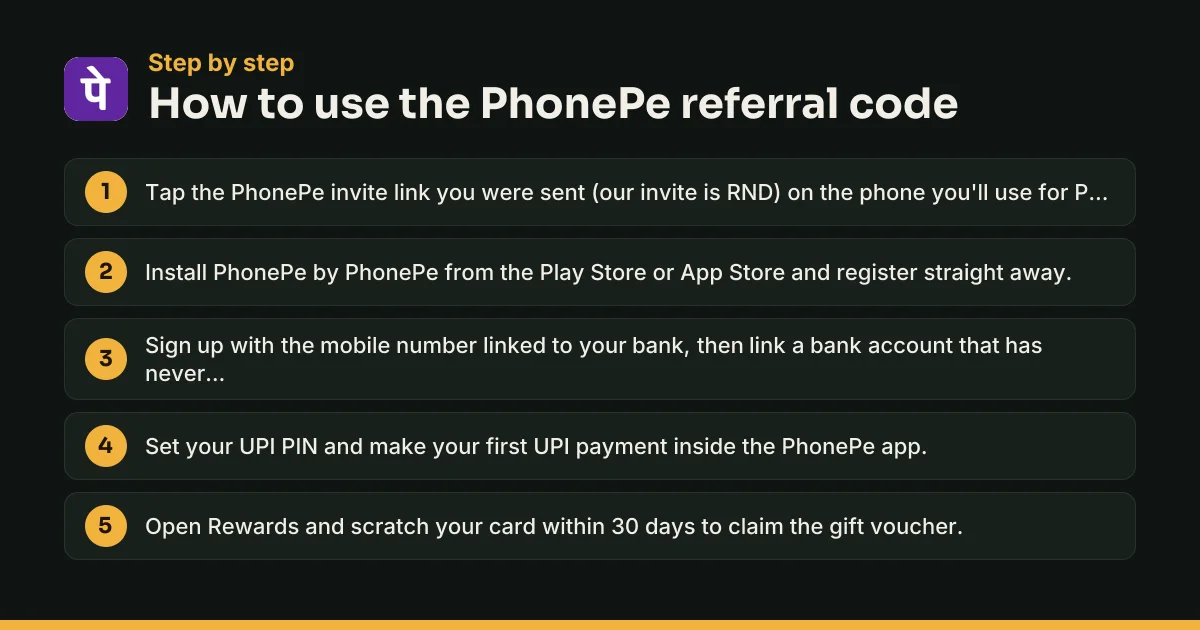
PhonePe referrals work through an invite link, not a code you type in. If someone sends you a PhonePe invite (ours is RND), open that link on your phone, install PhonePe, register and make your first UPI payment in the app. When a referral campaign is running, the reward comes as a scratch card that turns into a PhonePe Gift Voucher.
PhonePe doesn't publish one fixed referral amount. Each campaign sets its own figure and rules, and they can differ from user to user, so the number on your Refer & Earn screen is the one that counts.
PhonePe refer and earn: details at a glance
| Detail | What it means |
|---|---|
| Invite on this page | RND |
| App | PhonePe, by PhonePe Limited, Bengaluru |
| How referrals are tracked | Through the invite link sent from Refer & Earn |
| Referral amount | Set per campaign, shown on your Refer & Earn screen |
| How the reward is paid | Scratch card, credited as a PhonePe Gift Voucher |
| Voucher validity | 1 year |
| Yearly cap | ₹9,999 per financial year, across all PhonePe offers |
| Claim window | Scratch within 30 days or the reward is forfeited |
| Not available in | Tamil Nadu, and other states where prohibited |
| Cost | Free |
The reward rules in this table come from PhonePe's gift card and rewards terms. The referral amount and the exact conditions for each campaign appear only inside the app, under the offer's terms on the Refer & Earn screen.
What is the PhonePe referral code?
A referral code links a new account to the person who invited them. For the basics, see our guide on what a referral code is.
On PhonePe, the referral sits inside an invite link. PhonePe's help centre explains inviting as: open PhonePe, tap Refer & Earn, and choose the app you want to send the invite through. It doesn't describe a box where the new user types a code. That's why "where to enter referral code in PhonePe" has no clear answer: you don't type it, you install through the link.
Your UPI ID (the name@bank address you receive money on) is not a referral code.
PhonePe referral amount: how much can you get?
PhonePe runs referrals as short campaigns, so the amount keeps changing. Two of its own past offer pages show how much it moves:
- November–December 2017: the referrer got ₹75 cashback when the invited user completed their first UPI transaction on PhonePe.
- September 2021: new users who registered through a PhonePe link got a flat ₹25 cashback on their first UPI payment.
Neither of these is running now. Treat any amount you read online as a past campaign, and go by your own Refer & Earn screen.
PhonePe Earn is a different feature
PhonePe Earn pays you for tasks set by PhonePe's partner brands, such as referring their apps to friends or answering surveys. The reward is added to your PhonePe Gift Card. It doesn't involve inviting anyone to PhonePe itself, and its terms require you to be at least 18.
How to use a PhonePe referral link as a new user
The steps box above is the short version. Here are the details that decide whether the referral counts.
Before you start
- Keep the SIM linked to your bank account in your phone.
- Use a bank account that has never been linked to PhonePe. Past offers counted only once per user, once per device and once per bank account.
- Have your debit card details ready to set your UPI PIN.
Where to enter the referral code in PhonePe
- Tap the invite link you were sent on the phone you'll use for PhonePe.
- Install PhonePe from the Google Play Store or the App Store. Check that the developer is PhonePe.
- Open the app and register straight away. PhonePe's 2021 link offer required sign-up within one hour of tapping the link.
- Link your bank account and set your UPI PIN.
- Make your first UPI payment inside PhonePe: send money to a friend, pay a shop QR code, or pay a bill or recharge.
Past offers excluded first payments made through PhonePe on another merchant's app or website, so make the first payment inside the PhonePe app. The current campaign's terms will say how many days you have for it; the 2021 offer allowed 7.
How to claim the referral reward in PhonePe
If the campaign pays new users too, your reward appears as a scratch card in the Rewards section. Scratch it to add the amount to your PhonePe Gift Voucher balance. Do it soon: PhonePe forfeits cards that aren't scratched within 30 days.
Where to find your referral code in PhonePe
Once you're set up, inviting others takes a few taps:
- Open PhonePe and tap Refer & Earn. Look on the home screen first, then in your profile menu.
- Pick a channel, such as WhatsApp or SMS.
- Send the invite. Your personal referral is already built into the link.
If you don't see Refer & Earn, PhonePe's help centre says you can still invite people through Invite Now. That usually means no referral campaign is running for your account right now, so don't count on a reward.
How to refer and earn in PhonePe
When a campaign is live, you earn the amount shown on your Refer & Earn screen for each friend who joins through your link and completes the required first payment. To make your invites count:
- Pick people who are new to PhonePe. A phone, number or bank account used on PhonePe before won't qualify.
- Ask them to tap your link first, then install and register right away.
- Remind them about the first UPI payment. A small recharge or a payment to you is enough unless the terms set a minimum.
- Scratch your cards. Check Rewards after each friend pays, and claim within 30 days.
How to get referral money in PhonePe
Referral money arrives as gift voucher balance, not cash in your bank. You can spend it on mobile recharges, bill payments and payments on PhonePe partner platforms. It can't be withdrawn or sent to another user, and it expires after one year.
PhonePe referral not working? Fixes
Refer & Earn option not showing
Update the app and check again. If only Invite Now appears, no campaign is live for your account. Rewards also aren't offered in Tamil Nadu.
No reward after your friend's first payment
Check these one by one:
- Your friend installed PhonePe directly instead of through your link.
- Their phone, number or bank account was used on PhonePe before.
- They registered too long after tapping the link, or paid after the deadline.
- The first payment wasn't a UPI payment made inside the PhonePe app.
- You've reached the ₹9,999 yearly cap across PhonePe offers.
- The campaign ended. PhonePe can end offers without notice.
If everything checks out, raise it through Help in the app. Past PhonePe offers asked for cashback queries within 30 days of the transaction.
You installed PhonePe without the link
There's usually no way to attach a referral afterwards. You can still earn by inviting others when a campaign runs.
UPI safety tips for PhonePe users
Referral rewards are small; UPI fraud isn't. Keep these rules:
- You never need your UPI PIN to receive money. A PIN only ever sends money out of your account.
- Rewards appear on their own in the Rewards section. You never have to approve a collect request, scan a QR code or call anyone to get one.
- Never share your UPI PIN or OTP, even with someone claiming to be from PhonePe, NPCI or your bank.
- Use only official support: in-app Help, or the numbers on phonepe.com (080-68727374 and 022-68727374).
- Don't install screen-sharing apps because a stranger asked you to.
- Report fraud fast. Call the national cyber fraud helpline 1930 or file a complaint at cybercrime.gov.in, and tell your bank at once.
PhonePe reward rules in plain words
PhonePe's rewards terms set a few rules that apply to every referral campaign. Rewards are never guaranteed; they're issued under PhonePe's internal policies. Cashback is always paid as a gift voucher, capped at ₹9,999 per financial year. If a payment that earned cashback is refunded, the cashback stays as voucher balance and the refund is reduced by that amount. When you qualify for more than one offer, past PhonePe terms applied only the higher one.
The full list of catches is in the terms box below. Read the in-app terms of the specific campaign too, since they set the amount, deadlines and any minimum payment.
More UPI and app referral codes
PhonePe is one of several UPI apps with referral rewards. Compare them on our UPI and payment app referral codes page. Google Pay publishes a fixed referral reward, and the BHIM referral code pays cashback straight to your bank. Teens can look at the FamPay referral code, and once UPI is set up, the Zepto referral code gets you started on grocery orders.
Q: What is PhonePe?
PhonePe is a UPI payments app from India. You can send money to any UPI ID or mobile number, scan QR codes at shops, recharge your phone and pay electricity, DTH, FASTag and credit card bills. It also sells insurance, mutual funds and 24K digital gold and silver, and offers personal loans from partner lenders.
Q: Which company runs PhonePe?
PhonePe is run by PhonePe Limited, formerly PhonePe Private Limited, with its registered office in Bengaluru, Karnataka. The company launched the app in 2016. Its PhonePe Gift Cards are a prepaid payment instrument authorised by the Reserve Bank of India, and that is where cashback and referral rewards are credited.
Q: Is PhonePe free to use for UPI payments?
Sending money by UPI from your linked bank account costs you nothing on PhonePe. Some services, such as certain recharges or bill payments, can carry a small platform or convenience fee. If one applies, the app shows it on the payment screen before you enter your UPI PIN, so check the total first.
Q: Can I link a RuPay credit card to PhonePe UPI?
Yes. PhonePe lets you add an eligible RuPay credit card and use it for UPI payments at merchants, including scanning shop QR codes. Credit card UPI payments go to merchants, not to friends' bank accounts. Whether a card works depends on your card issuer, so check the add-card screen in the app.
Q: What is the PhonePe Gift Card or gift voucher?
It's PhonePe's prepaid balance. Cashback and rewards arrive as a gift voucher, which you can spend on recharges, bill payments and payments on PhonePe partner platforms. It expires one year after it's issued, can't be reloaded or sold, and can't be withdrawn to your bank account or sent to another user.
Q: What is PhonePe Earn?
PhonePe Earn is a separate feature where you complete tasks for PhonePe's partner brands, such as referring their apps to friends or answering surveys. Once a task is complete, the amount is added to your PhonePe Gift Card. You must be at least 18 to take part. It is different from inviting friends to PhonePe itself.
Q: Is PhonePe safe to use?
PhonePe works on UPI, so every payment needs your UPI PIN and money moves straight between bank accounts. The main risks come from scams, not the app. Install it only from the official store listing by PhonePe, never share your PIN or OTP, and only use support numbers listed on phonepe.com.
Q: How do I contact PhonePe customer care?
Use Help inside the app, or call the numbers on PhonePe's contact page: 080-68727374 or 022-68727374. If a complaint stays unresolved for 7 business days, PhonePe lets you escalate it to its Nodal Officer. Never call numbers posted in comments or social media replies; fake helplines are a common UPI scam.
Q: Can I use PhonePe without a bank account?
You need a bank account linked to your mobile number to send money by UPI, set a UPI PIN or qualify for a referral reward. Without one, you can't make the first UPI payment that past PhonePe referral offers required, so link your bank account before you try to claim any invite reward.
Q: What is the PhonePe refer and earn programme?
It's how PhonePe rewards existing users for bringing in new ones. You send an invite from the Refer & Earn screen, your friend installs PhonePe through it and makes a first UPI payment, and PhonePe issues the reward as a scratch card that becomes a gift voucher. Amounts and rules change with each campaign.
Q: How do I claim my referral reward in PhonePe?
Open the Rewards section in the app after your friend's first payment goes through. The reward shows up as a scratch card. Scratch it to reveal the amount, which is then added to your PhonePe Gift Voucher balance. PhonePe's terms say cards not scratched within 30 days are forfeited, so check regularly.
Q: Can I move PhonePe referral money to my bank account?
No. PhonePe's rewards terms say cashback is given as a PhonePe Gift Voucher and can't be withdrawn to a linked bank account or transferred to other users. You can spend it on mobile recharges, bill payments and payments on PhonePe partner platforms or stores. Use it before it expires after one year.
Q: Does PhonePe refer and earn work in Tamil Nadu?
No. PhonePe's rewards terms say rewards are not available in Tamil Nadu because of the Tamil Nadu Prize Scheme (Prohibition) Act, 1979, or in other states where prohibited by law. You can still use PhonePe for payments there and share invites, but scratch-card rewards won't be paid.
Q: Is there a limit on PhonePe referral earnings?
Yes. PhonePe caps all offer earnings at ₹9,999 per financial year, from 1 April to 31 March. That cap covers every offer on PhonePe, not just referrals, so cashback from other promotions counts towards it too. A campaign can also set its own lower limit, which will be listed in its in-app terms.
Q: Can I gift a PhonePe reward to someone else?
PhonePe's help centre describes a gifting option for rewards you receive. If the person you want to gift a reward to isn't on PhonePe yet, you first have to refer them so they install and use the app. Gifting options depend on the reward, so check the reward card in your app.
Q: What happens to my cashback if a payment is refunded?
Under PhonePe's rewards terms, cashback already given stays in your account as gift voucher balance and can't be withdrawn. The refund that goes back to your original payment method is the amount you paid minus that cashback. You can keep using the voucher balance for recharges and bill payments.
Q: Is the Share.Market referral the same as PhonePe refer and earn?
No. Share.Market is PhonePe's separate stock-broking app, and it runs its own referral programme with its own terms, rewards and limits. This page covers inviting friends to the PhonePe payments app. If you want to refer someone to Share.Market, use the referral screen inside that app and read its own terms.
Q: PhonePe ka referral code kahan milega?
PhonePe app kholiye aur Refer & Earn par tap kijiye. Wahan se aap apna invite link WhatsApp ya SMS par bhej sakte hain; aapka referral isi link se track hota hai. Agar Refer & Earn nahi dikh raha, to Invite Now se bhi friends ko bula sakte hain, par reward ki guarantee nahi hai.
Q: Can I create a new PhonePe account to get the referral reward again?
No. PhonePe's past referral offers were valid once per user, once per device and once per bank account, so a new number on the same phone or bank account won't qualify. PhonePe can also pull back rewards and restrict accounts when it spots suspicious activity, so don't try to game it.
PhonePe offer terms to know
- PhonePe sets the referral amount for each campaign, and offers can differ from user to user. The figure on your Refer & Earn screen is the one that applies.
- Rewards are credited as a PhonePe Gift Voucher. It can't be withdrawn to your bank account or transferred to another user.
- Gift vouchers are valid for 1 year from the date they are issued.
- You can earn up to ₹9,999 per financial year (1 April to 31 March) across all PhonePe offers.
- Scratch cards not claimed within 30 days are forfeited.
- Rewards are not available in Tamil Nadu (Tamil Nadu Prize Scheme (Prohibition) Act, 1979) or in other states where prohibited by law.
- PhonePe can change or end any offer without notice, and can pull back rewards if it detects suspicious or fraudulent activity.
PhonePe Referral Code: quick FAQs
What is the PhonePe referral code?
The PhonePe invite on this page is RND. PhonePe tracks referrals through the invite link sent from the Refer & Earn screen, so open the link on your phone before you install the app, then make your first UPI payment.
Where do I enter a referral code in PhonePe?
PhonePe's help pages describe referrals only through invite links and don't mention a box for typing a code. Tap the invite link first, then install and register. If you already installed PhonePe without the link, the referral usually can't be added later.
How do I find my own referral code in PhonePe?
Open PhonePe and tap Refer & Earn, then pick WhatsApp, SMS or another app to send your invite. Your personal referral is built into that link. If Refer & Earn is missing, use Invite Now instead.
How much is the PhonePe referral amount?
PhonePe doesn't publish a standing amount. Each campaign sets its own, and it can differ between users. Your Refer & Earn screen shows the current figure and terms. Official past offers ranged from ₹25 for new users to ₹75 for referrers.
Is the PhonePe referral code free?
Yes. Inviting friends and joining through an invite cost nothing. Never pay anyone for a PhonePe invite, and never share an OTP or UPI PIN to unlock a reward.
Why didn't I get my PhonePe referral reward?
Common reasons: your friend didn't install through your link, their phone, number or bank account was used on PhonePe before, the first payment wasn't a UPI payment in the PhonePe app, the campaign ended, or you live in Tamil Nadu.
How do I refer and earn in PhonePe?
Open Refer & Earn, send your invite link to someone new to PhonePe, and ask them to install through it and make their first UPI payment. Your reward appears as a scratch card in Rewards.
Written by Recharge n Deals Team
We sign up for every app we list, test the code ourselves and recheck it when the offer changes. Read how we test codes. Code not working? Tell us and we'll recheck it.
Disclaimer: PhonePe is a trademark of its owner. We are not affiliated with PhonePe. Offers are set by PhonePe and can change at any time; check the app before you sign up.